
Building forms
Forms are how people apply to your teams and appeal punishments. You build them in the dashboard; members fill them in on the website; your team decides, and the person hears back by direct message.
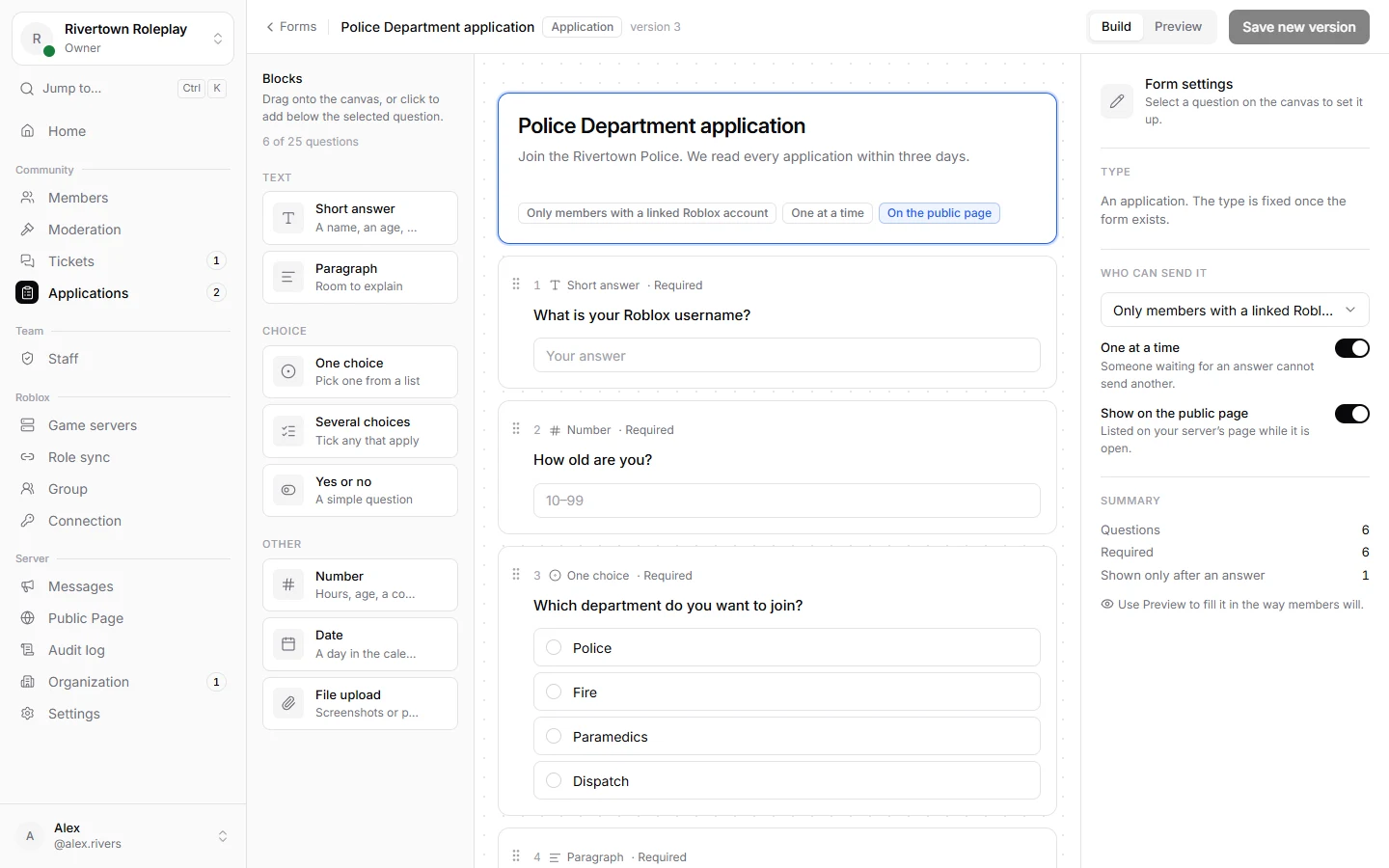
Applications and appeals
| Kind | For | Special |
|---|---|---|
| Application | Joining a team: staff, a department, an event crew. | Can be limited to members who linked Roblox. |
| Appeal | Asking for a punishment to be lifted. | Linked to the punishment, so approving can lift it. Its link is in the message about the punishment. |
Making a form
- Open Applications → Forms and press New application or New appeal.
- Give it a Form title and a short Form description: what it is for, and what happens after.
- Drag questions in from the side, or press them to add them. Drag them into order.
- Use Preview to fill it in the way members will. Then press Save new version and open the form. Until it is open, it is a draft nobody can fill in.
- Share it: copy its link, show it on your public page, or put the link in a message.
Kinds of questions
| Question | Good for |
|---|---|
| Short answer | A name, a Roblox username, one line. |
| Paragraph | Why they want to join, what happened. |
| One choice, Several choices | Time zone, which department, what they can do. |
| Yes or no | Have you been staff before? |
| Number, Date | Age, hours per week, a date of birth or of an incident. |
| File upload | A screenshot or a clip, up to 8 MB. |
Every question can be Required, get Help text, and limits like the shortest answer or the highest number. A form can have up to 25 questions.
Questions that depend on answers
Under Logic, a question only appears after certain answers to earlier ones. Example: ask “Which server were you staff on?” only to people who answered yes to “Have you been staff before?”. Add several conditions and choose All of these are true or Any one of these is true.
| Earlier question | You can ask whether it |
|---|---|
| Yes or no, One choice | is, is not |
| Several choices | includes, does not include |
| Number | is, is not, is at least, is at most |
| Date | is on or after, is on or before |
| Short answer, Paragraph | contains, does not contain |
| Every kind | is answered, is not answered |
A hidden question is never required, and answers to it are not kept.
Pages
Drag in a Section to start a new page with a title and a line under it. Members move through pages with Next and Back. A section can have logic too: then the whole page only appears after certain answers. Sections do not count toward the 25 questions.
Answers that end the form
Under End the form, pick an answer that rules somebody out, such as an age under 13, and write what they are told instead. The form stops there and cannot be sent, so nobody has to decline it by hand.
Who can send it
| Choice | Who |
|---|---|
| Anyone in the server | Every member of your Discord server who signs in. |
| Only members with a linked Roblox account | For staff applications, so you know who they are in game. |
| Only people with a direct link | Not listed anywhere; only people you send the link to. |
Show on the public page lists it on your public page. One at a time stops somebody from sending another while one is still waiting.
Appeal forms
An appeal form says what it Appeals against: bans, mutes, warnings or kicks. While it is open, everybody who gets that kind of punishment on Discord sees an Appeal button in the bot’s message, and players banned from your game see its link when they try to join.
By default only somebody with an active punishment of that kind can send it, and it is linked to that punishment, so approving it can lift it in the same step. Turn off Only people with an active … to take appeals from anybody, for example against a warning that already ran out. Both can be changed later; they apply to appeals sent from then on.
When somebody sends one
- It appears under Applications and on the home page of everybody who may decide it.
- If you set a log channel for new applications or appeals, it is posted there too. See Log channels.
- Deciding it is in Reviewing applications.
Open, paused and archived
Open forms take submissions. Pause one to stop new submissions for a while, for example when you have enough applicants. Archived forms keep their submissions but cannot be filled in. Changing questions later never changes answers already sent: each submission is kept with the questions it answered.
Good to know
Still stuck? Get help from the Technified team.