
Role sync
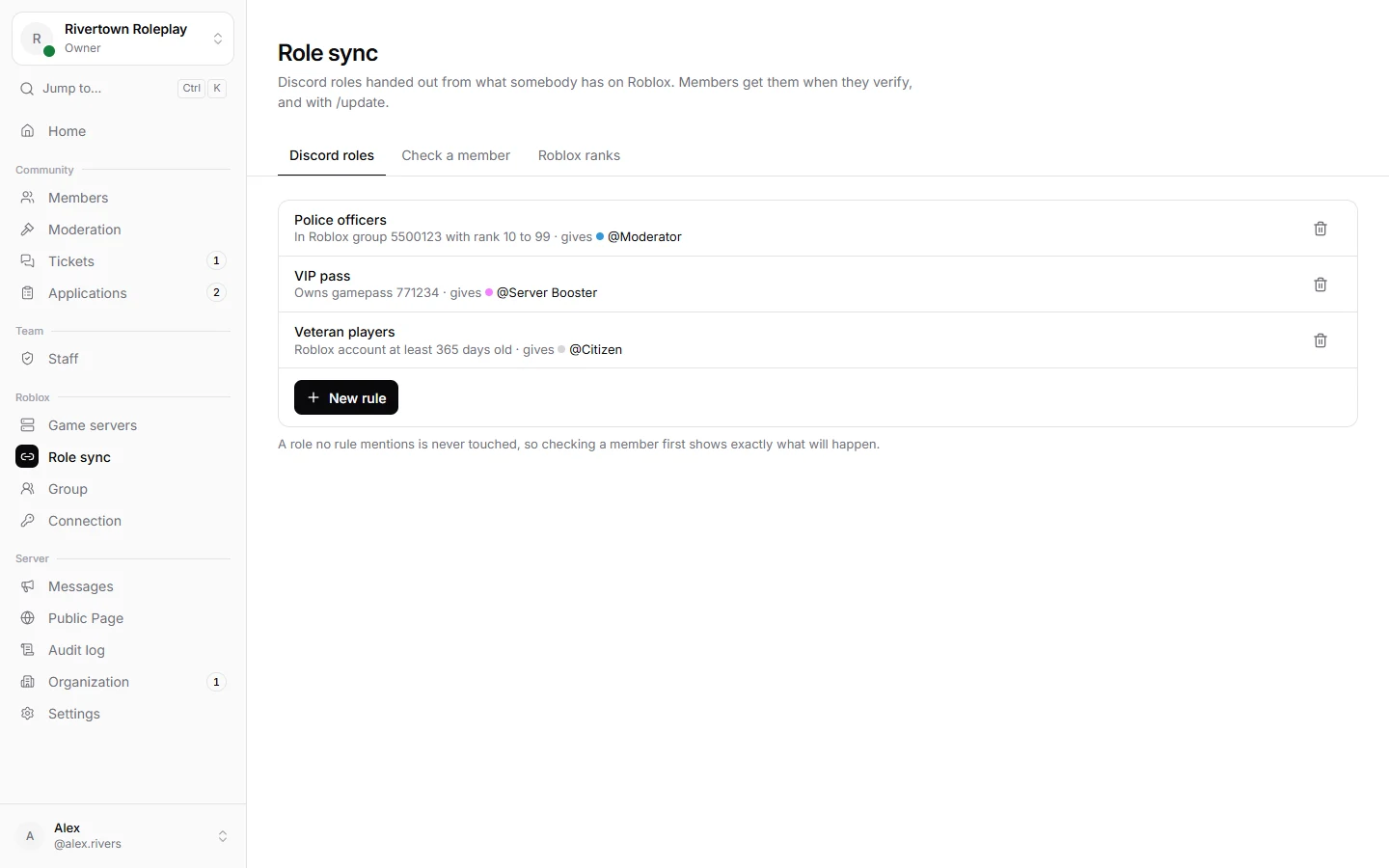
Role sync gives members Discord roles for what they have on Roblox: a rank in a group, a game pass, a badge. It also works the other way round: Roblox group ranks for Discord roles.
How it decides
Every time a member’s roles are worked out, Technified goes through your rules:
- A role is given if at least one rule for it is met.
- A role that a rule mentions is taken away if none of its rules is met any more, even if somebody gave it by hand.
- A role no rule mentions is never touched. Your other roles are safe.
- Members who have not verified get none of these roles, only the role for unverified members if you set one.
Careful
/update, or staff press Update roles. A promotion in your group does not show in Discord until then. Ask members to run /update after a promotion.Making a rule
- Open Role sync and press New rule.
- Pick the Discord role to give.
- Pick the condition and fill it in.
- Save. Check it on a member right away (below).
To change a rule later, press the pencil next to it. You can change the role, the condition and the name. Like a new rule, the change applies the next time members are updated.
| Condition | Gives the role to verified members who |
|---|---|
| In a Roblox group | are in the group. Optional: only from one rank to another, or only with one Roblox role. |
| Owns a gamepass | bought a game pass. |
| Owns an item | own a hat, shirt or other item. |
| Has a badge | earned a badge, for example in your game. |
| Account is old enough | have a Roblox or Discord account at least so many days old. |
Game passes, items and badges are read from the member’s Roblox inventory. If they hide their inventory in their Roblox privacy settings, these rules do not give them the role. Group rules and the rest still work.
Rank range or one Roblox role? Since 2026, Roblox lets people hold several roles in a group. A rank range (for example 50 to 255) looks at the number of their highest role. “One Roblox role” looks for that role, whatever else they hold, which suits extra roles like “Event Team”.
Example
| Discord role | Rule |
|---|---|
| Group Member | In group 12345, any rank. |
| Officer | In group 12345, rank 100 to 199. |
| High Command | In group 12345, rank 200 to 254. |
| VIP | Owns game pass 987654. |
Somebody promoted from rank 150 to 210 who runs /update gets High Command and loses Officer. Somebody who leaves the group loses all three at their next update.
Check a member
Check a member shows, for anybody, which roles they would get or lose and which rule decided it, without changing anything. Use it whenever a member says they did not get a role.
Roblox ranks from Discord roles
Under Roblox ranks it works the other way round: holding a Discord role gives a rank in your Roblox group, for example the Discord role Moderator gives the group rank Moderator. Like everything else, this happens when the member’s roles are worked out, not the moment you give the Discord role. It needs a Roblox API key; see Your Roblox group.
Still stuck? Get help from the Technified team.